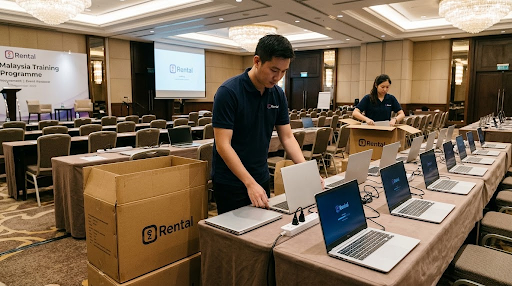


Choosing the right strategy for managing your business hardware is crucial to ensuring optimal performance, cost efficiency, and sustainability.
Whether you opt for a hardware refresh or an upgrade, each approach has its advantages depending on the age and needs of your IT infrastructure.
This article explores the differences, benefits, and factors to consider when deciding between refreshing or upgrading your business hardware so you can make the best choice for your organisation.
When to Choose a Hardware Refresh
Key Indicators for a Full Refresh
A hardware refresh is essential when devices reach the end of their lifecycle. Typically, devices older than 3–5 years start experiencing performance and reliability issues, leading to frequent repairs and increased downtime.
In many cases, the costs of maintaining outdated hardware can exceed the expense of replacing it entirely.
Another critical factor is compatibility with modern technology. Older hardware may no longer support current software, operating systems, or security updates, leaving businesses vulnerable to cyber threats.
For instance, Microsoft will discontinue support for Windows 7, 8.1, and 10 by October 2025, requiring businesses to upgrade their systems to maintain security and functionality.
Additionally, businesses undergoing rapid growth or transitioning to remote work often require modern, scalable systems that can support their evolving needs.
In such scenarios, a hardware refresh is often the best option to ensure seamless operations.
Benefits of a Hardware Refresh
A full hardware refresh provides several key benefits:
- Performance and Efficiency: New devices are faster, more energy-efficient, and optimised for running the latest software.
- Enhanced Security: Modern hardware has advanced security features, reducing exposure to cyber risks.
- Minimised Interruptions: Reliable, updated devices reduce downtime caused by frequent hardware failures.
- Cost Savings Over Time: Investing in new hardware lowers long-term maintenance and repair expenses, justifying the upfront cost.
Read More: Cost-Effective IT Solutions: Refurbished Devices vs. DIY Repair
When to Choose a Hardware Upgrade

Key Indicators for an Upgrade
Upgrading hardware components within existing devices can be a smart, cost-effective solution in several situations.
If devices are relatively new, typically 2–4 years old, they may still have significant potential for extended use.
Instead of replacing the entire device, upgrading specific components like RAM or storage can address immediate performance issues.
Upgrades are also ideal for businesses that need a temporary performance boost while planning for a future hardware refresh.
For example, adding an SSD or increasing RAM can significantly improve boot times and multitasking capabilities without the expense of new equipment.
Benefits of a Hardware Upgrade
- Cost Savings: Upgrading components is much cheaper than purchasing new devices, making it an appealing option for budget-conscious businesses.
- Improved Performance: Simple upgrades, such as adding an SSD or more RAM, can dramatically enhance device speed and usability.
- Sustainability: Extending the lifespan of existing hardware reduces e-waste and aligns with eco-friendly business practices.
- Minimal Disruption: Hardware upgrades are quick to implement, minimising downtime and maintaining workflow continuity.
Factors to Consider Before Making a Decision
1. Budget
Firstly, evaluate the upfront costs of a hardware refresh versus targeted upgrades. While a refresh requires a larger initial investment, it often reduces long-term maintenance costs.
For budget-conscious businesses, technology financing (TechFin) or rental services may offer flexible solutions.
2. Current Hardware Lifecycle
Then, if devices are nearing the end of their lifecycle (3–5 years), a refresh might be the best option.
Upgrades can deliver the desired performance improvements for newer equipment without replacing the entire device.
3. Business Growth and Needs
Additionally, growing businesses or those with evolving IT needs may benefit more from a refresh to ensure scalability.
However, upgrades are suitable for addressing immediate performance concerns.
4. Sustainability Goals
Furthermore, upgrades align with eco-friendly goals by reducing e-waste, but newer hardware may offer improved energy efficiency. Businesses should weigh these factors against their sustainability initiatives.
5. Downtime
Lastly, a hardware refresh may require longer downtime for setup and deployment but delivers comprehensive improvements.
Upgrades, on the other hand, can be performed incrementally, minimising workflow disruptions.
Read More: IT Fails in Corporate Environment: Short Rental to the Rescue
EzRental’s Refurbished Device Rentals: A Cost-Effective Middle Ground

What Are Refurbished Devices?
Refurbished devices are pre-owned IT equipment that has undergone a rigorous process, repaired, and certified for reuse. These devices offer businesses a budget-friendly alternative to purchasing brand-new hardware.
Why Choose EzRental’s Refurbished Device Rentals?
1. Affordable Refresh Solution
To start, renting refurbished devices allows businesses to access high-quality equipment at a fraction of the cost.
This is especially beneficial for companies with tight budgets that need immediate performance improvements.
2. Performance and Reliability
EzRental’s refurbished devices also undergo rigorous testing and are upgraded with components like SSDs, increased RAM, and updated software. This ensures they meet industry standards for performance and reliability.
3. Flexible Rental Plans
Moreover, EzRental offers short-term and long-term rental options, allowing businesses to scale their IT equipment as needed without heavy upfront investments.
4. Sustainability and Environmental Impact
In addition, by choosing refurbished devices, businesses contribute to the circular economy, reducing e-waste and the carbon footprint associated with manufacturing new devices.
5. Maintenance and Support
Finally, EzRental provides comprehensive maintenance, repairs, and upgrades during the rental period, minimising operational disruptions and reducing IT management overhead.
Choosing the Right Approach for Your Business with EzRental
In conclusion, when deciding between a hardware refresh and an upgrade, businesses must consider budget, current hardware lifecycle, and sustainability goals.
A hardware refresh is ideal for older devices or growing IT needs, while targeted upgrades can extend the life of newer equipment.
For those seeking a cost-effective, sustainable solution, EzRental’s refurbished device rentals provide the perfect balance between performance and affordability.
Explore EzRental’s long-term and short-term rental options to access high-quality refurbished devices and optimise your IT infrastructure with minimal investment.